← HADI Series2D X-RAY INSPECTION / 02—05

BGA & VOID INSPECTION

HADI-BGATurn every solder ball into measurable evidence

Detect BGA balls, review radius values and overlapping shapes, and inspect internal voids in the same template-based X-ray workflow

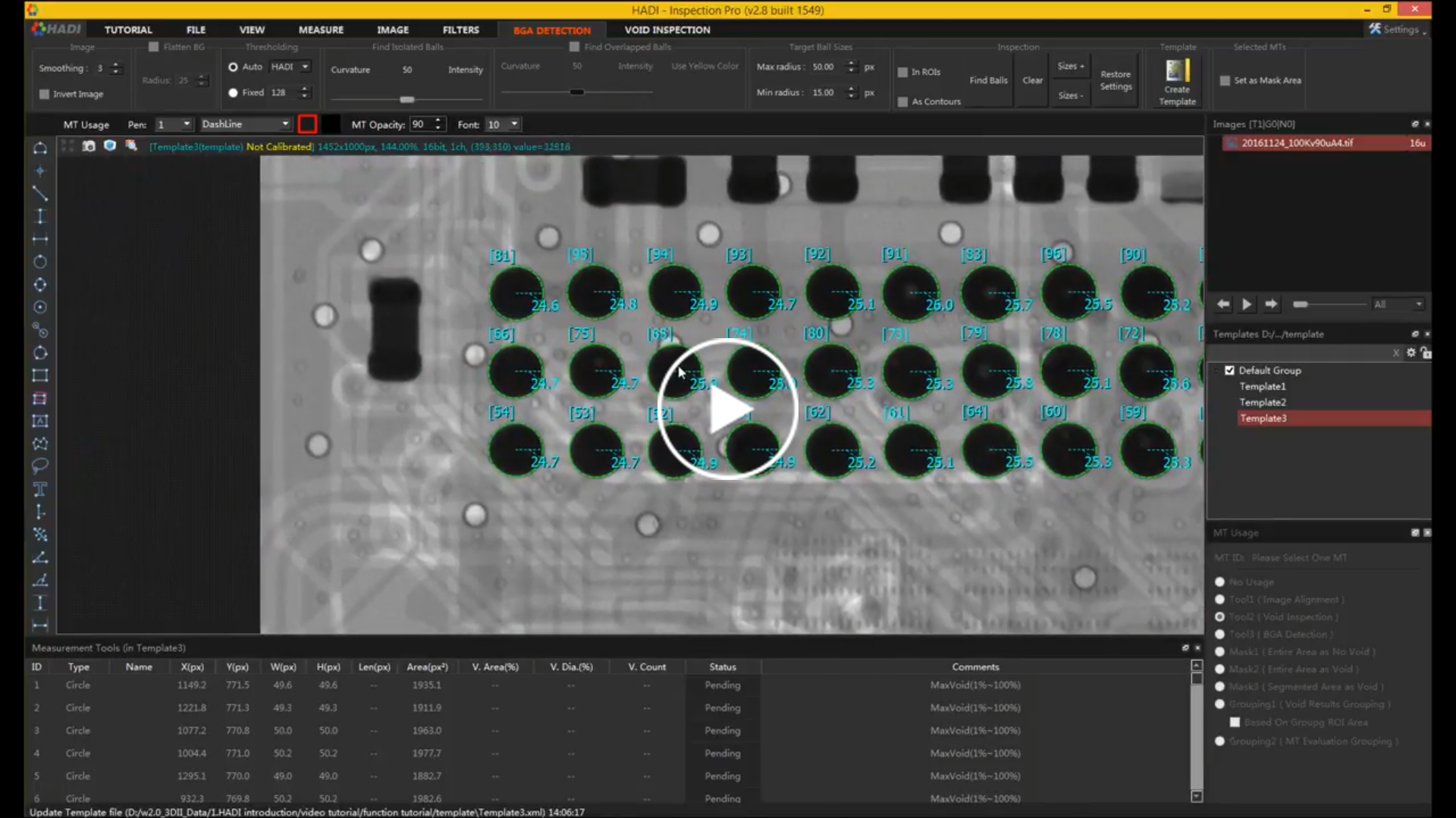
HADI-BGA interface detecting and measuring solder balls in an X-ray image
SOFTWARE VIEWHADI-BGA
PRIMARY TASKBGA detection
ALSO INCLUDESVoid inspection
SETUPTemplate-based
BEST FITElectronics review

01 / PRODUCT FOCUS

A focused toolset for a defined inspection job

01

Automatic ball detection

Create circular regions around solder balls and review the detected radius for each position

02

Overlapped BGA support

Identify adjacent or overlapping solder-ball shapes that need closer inspection

03

Void evaluation

Use the shared HADI void tools to examine internal voids alongside BGA geometry

02 / CAPABILITIES

See how the work comes together

The HADI interface keeps image preparation, inspection regions, results, and supporting tools in one working environment

Rows of BGA solder balls automatically outlined and measured
BGA detection / radius review
01

BGA DETECTION

Map solder balls and make size differences visible

HADI-BGA places circular regions over detected balls and displays radius measurements, giving reviewers a consistent starting point for BGA assessment
  • Simple and advanced BGA detection
  • Radius value for each detected ball
  • Support for overlapping ball shapes
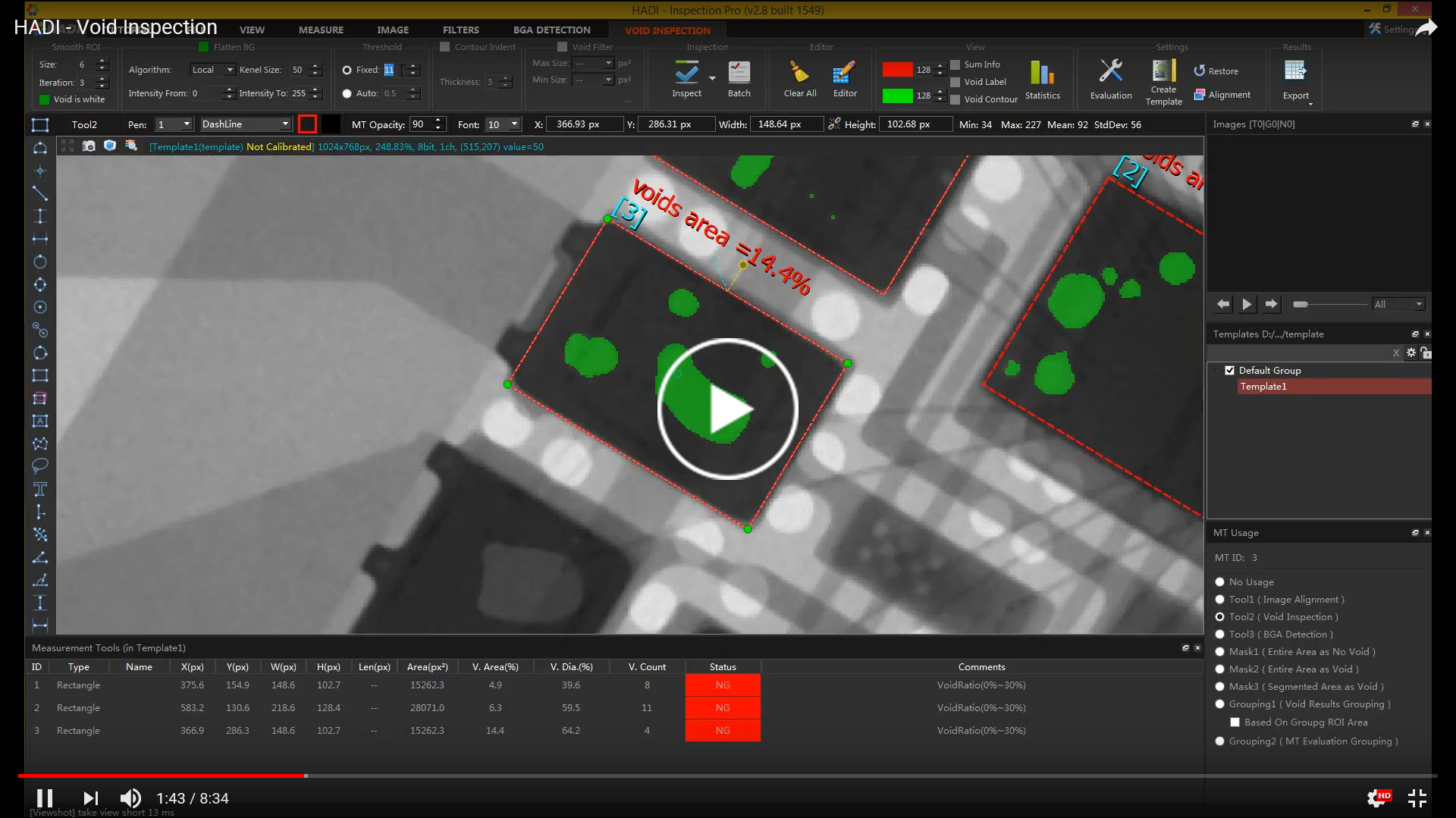
HADI void inspection results shown on electronics X-ray imagery
Void inspection / evaluation regions
02

VOID INSPECTION

Inspect internal voids without leaving the BGA workflow

Use template-based void inspection to identify low-contrast regions and evaluate the area inside selected solder joints
  • Automated void inspection
  • Reliable segmentation on uneven backgrounds
  • Editable regions and evaluation settings
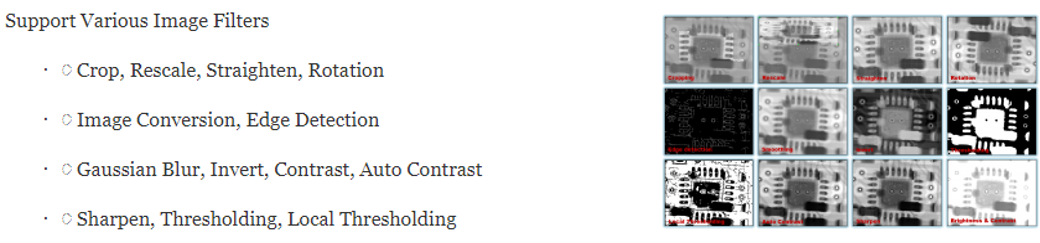
HADI image filter examples for industrial X-ray images
Image processing / filter examples
03

COMMON TOOLKIT

Prepare difficult X-ray images for a clearer review

Image filters, calibration, alignment, and measurement tools help normalize the image before the final BGA or void decision

  • 16-bit image input and window-level adjustment
  • Image filters and conversion
  • Measurement, histogram, and profile tools

03 / WORKFLOW

Keep the inspection path easy to follow

  1. 01

    Teach

    Define the part and save its inspection template

  2. 02

    Detect

    Locate BGA balls and overlapping structures

  3. 03

    Evaluate

    Review radius values and internal voids

  4. 04

    Report

    Capture and export the inspection result

04 / SHARED HADI TOOLKIT

Core image tools included across the series

Every HADI product includes the foundational tools needed to load, prepare, measure, review, and communicate 2D X-ray images

01Image and scene import/export02Print, screen capture, and reporting03Multiple language support04Up to 21 measurement tools05Up to 14 image filters06Image calibration and alignment07Histogram and profile08Multiple-image display0916-bit image support10Image conversion11Command-line support

SOFTWARE DOWNLOADS

Ready to work with HADI-BGA?

Find archived installers, product manuals, and the industrial software guide in one library. Check the version and license requirements before changing a production workstation.

Open software downloads